> For the complete documentation index, see [llms.txt](https://guide.bocto.octopeeps.com/llms.txt). Markdown versions of documentation pages are available by appending `.md` to page URLs; this page is available as [Markdown](https://guide.bocto.octopeeps.com/user-profile/user-verification-process.md).
# User Verification Process
## Verification Pipeline.
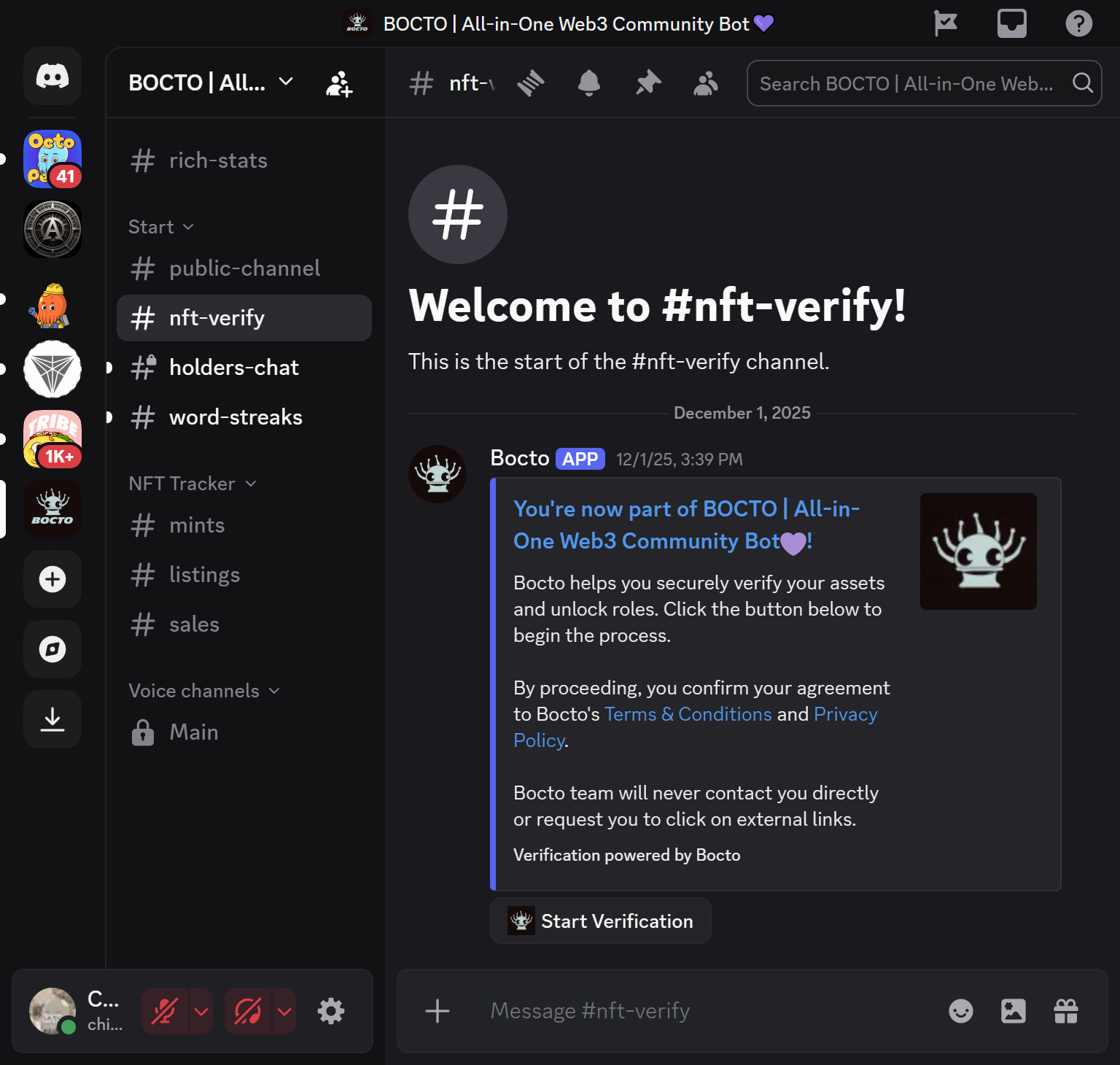
### Step 1 - Initiating Verification.
To claim the roles on the server with **Bocto**, look for the corresponding channel that contains this widget and click the `Start Verification` button.
### Step 2 - Creating Bocto User Profile (Optional).
If you don't have a **Bocto** user profile yet, this message will appear:
To create the profile and add wallets, click the `Click here to log in` button to visit the **Bocto** website and follow this guide:
{% content-ref url="/pages/cgD0Sey6R4Xj06pwkxpO" %}
[Creating/Deleting User Profile](/user-profile/creating-deleting-user-profile.md)
{% endcontent-ref %}
Then come back and click the `Start Verification` button again.
### Step 3 - Adding User Wallets (Optional).
This time, **Bocto** will ask you to add wallets if you didn't do it right after creating your profile:
To add wallets, click the `Add Wallet from Dashboard` button to visit the **Bocto** website one more time and follow this guide:
{% content-ref url="/pages/CBwJtCLYSkRrlYQHKCAb" %}
[Adding/Removing Wallets](/user-profile/adding-removing-wallets.md)
{% endcontent-ref %}
Then come back, scroll up to the very first embed, and click the `Start Verification` button again.
### Step 4 - Assigning Roles.
Now you will see this picture - **Bocto** is running a scan across all your added wallets:
And when it finishes, you will see the embed with the scan summary, where:
* **New Roles Added** - **Bocto** roles added during the current verification session.
* **Roles Removed** - **Bocto** roles removed during the current verification session.
* **Current Roles** - All **Bocto** roles you currently have as a result of all verification sessions.
## Verification Frequency.
For manual user-initiated verification (the one that was described above), there are no frequency limits, just a 1-minute cooldown. This means that if, during the day, you buy several NFTs of the projects that use **Bocto** verification on their servers, you can initiate the verification process again and again on every new (or even the same) server to renew your holder status.
**Bocto** also uses automatic and manual server owner-initiated verification, the frequency of which depends on the selected premium plan. You can see the details [here](/plugins/verify-roles/introduction.md#capabilities-comparison). That means that if getting roles is not urgent for you, **Bocto** will automatically monitor your holder's status in the background, checking your wallets at regular intervals. And yes, that means you don't even need to initiate verification yourself - eventually, **Bocto** will assign (or remove) the appropriate roles on all associated servers anyway.
.png?alt=media&token=c0dbde9b-fb37-4764-8179-204c7517de10)
.png?alt=media&token=d44faf87-4f02-4ef6-a24d-1c222f1e236e)
.png?alt=media&token=705dc278-cb73-4fcc-8314-b2bc0a043874)
.png?alt=media&token=071ce6d5-b72f-450e-a61d-f6219d96bb03)