> For the complete documentation index, see [llms.txt](https://guide.bocto.octopeeps.com/llms.txt). Markdown versions of documentation pages are available by appending `.md` to page URLs; this page is available as [Markdown](https://guide.bocto.octopeeps.com/plugins/mini-games/word-streak/commands-and-widgets.md).
# Commands and Widgets
The Word Streak offers a set of Discord commands to give users various types of statistics. here is the list of all of them.
## Current Server Active Streaks List.
The `/wordstreak-events` command shows the embed with a list of all active **Word Streak** events on the current server and their details.
{% hint style="info" %}
This message can only be seen by the user who launched the command.
{% endhint %}
## User's Current Server Active Streaks Progress.
The `/wordstreak-user-streak` command shows the embed with a list of user progress in all active **Word Streak** events on the current server.
Run the command. It will ask you to select a user whose progress you want to see:
If you wish to check your own progress, then choose your name. The embed with the list of active streaks on this server that the user took part in will appear:
{% hint style="info" %}
This message can only be seen by the user who launched the command.
{% endhint %}
## User's Cross-Server All-Time Streaks Stats.
The `/wordstreak-global-user-stats` command shows the embed with all-time **Word Streak** stats across all **Bocto** servers.
Run the command. It will ask you to select a user whose global stats you want to see:
If you wish to check your own stats, then choose your name. The embed with the global statistics across all streaks that have ever happened on any server and that the user has ever taken part in will appear:
{% hint style="info" %}
This message can only be seen by the user who launched the command.
{% endhint %}
## Top 10 Current Server Active Streaks Leaderboard.
The `/wordstreak-leaderboard` command shows embeds with the Top 10 **Word Streak** leaderboard for each active streak on the current server.
{% hint style="warning" %}
This message is visible to all users.
{% endhint %}
## Full Current Server Active Streaks Leaderboard.
The `/wordstreak-leaderboard-paged` command shows the embed with the full **Word Streak** leaderboard for a particular event with pagination.
Run the command. The embed with the dropdown containing the active streaks list will appear:
Click on the desired streak. The embed with the full leaderboard, divided into pages with 10 users per page and pagination, will appear:
{% hint style="info" %}
This message can only be seen by the user who launched the command.
{% endhint %}
## All-Time Global Users Top.
The `/wordstreak-global-users-top` command shows the embed with the all-time **Word Streak** users leaderboard across all **Bocto** servers.
{% hint style="info" %}
This message can only be seen by the user who launched the command.
{% endhint %}
## All-Time Global Servers Top.
The `/wordstreak-global-servers-top` command shows the embed with the all-time **Word Streak** servers leaderboard (top guilds by streak activity).
{% hint style="info" %}
This message can only be seen by the user who launched the command.
{% endhint %}
## Important!
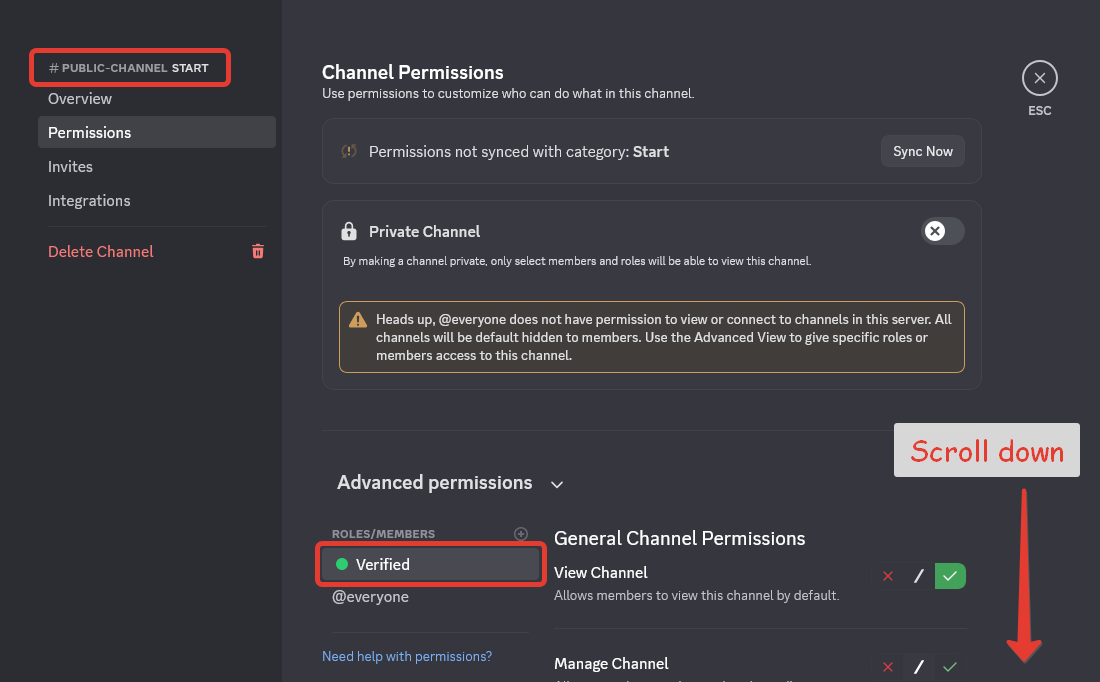
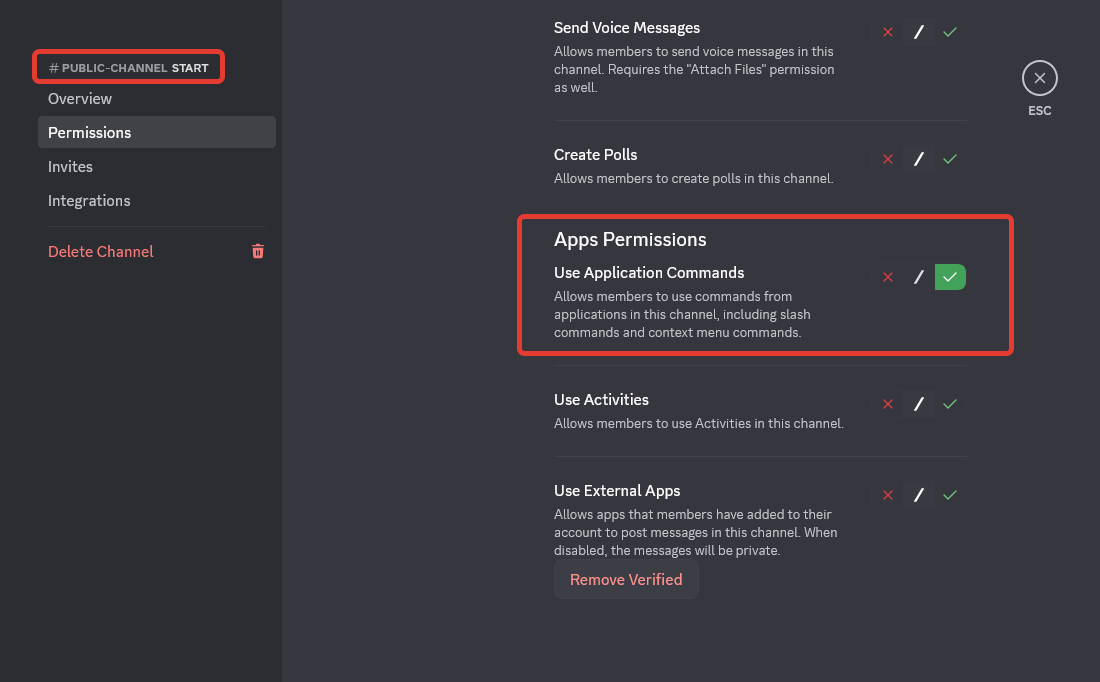
To allow users to use these commands in the desired channel, don't forget to grant the Use Application Commands permissions to the desired roles in the channel settings!
.png?alt=media&token=477c303d-bc0f-4a44-95f7-87024658358a)
.png?alt=media&token=043ef156-bf62-406a-8c6f-817ee36d3043)
.png?alt=media&token=137cf925-ba71-4535-8a10-19f2f93e648c)
.png?alt=media&token=c2851ead-960c-4022-bcf5-cde775b58148)
.png?alt=media&token=bf022aee-b8b5-4da3-bbb4-2aff6e5f89e6)
.png?alt=media&token=a1741e52-5f60-4665-bd08-d333f09e4583)
.png?alt=media&token=943ddfe9-54a3-4289-9191-28c4846e8623)
.png?alt=media&token=74d25c0c-b4a8-4604-82d7-528cb29c0b94)
.png?alt=media&token=47390ce0-e26b-49ca-8c3b-3fc985a97671)
.png?alt=media&token=99173a83-f69f-49e4-96c7-f14fc9adc7be)