> For the complete documentation index, see [llms.txt](https://guide.bocto.octopeeps.com/llms.txt). Markdown versions of documentation pages are available by appending `.md` to page URLs; this page is available as [Markdown](https://guide.bocto.octopeeps.com/plugins/guard/guard-features/users-with-transparent-pfps.md).
# Users With Transparent PFPs
This feature evaluates the user's PFP and blocks the message if the ratio of the transparent and opaque pixels doesn't matchs the tolerance.
## Scam Mechanics.
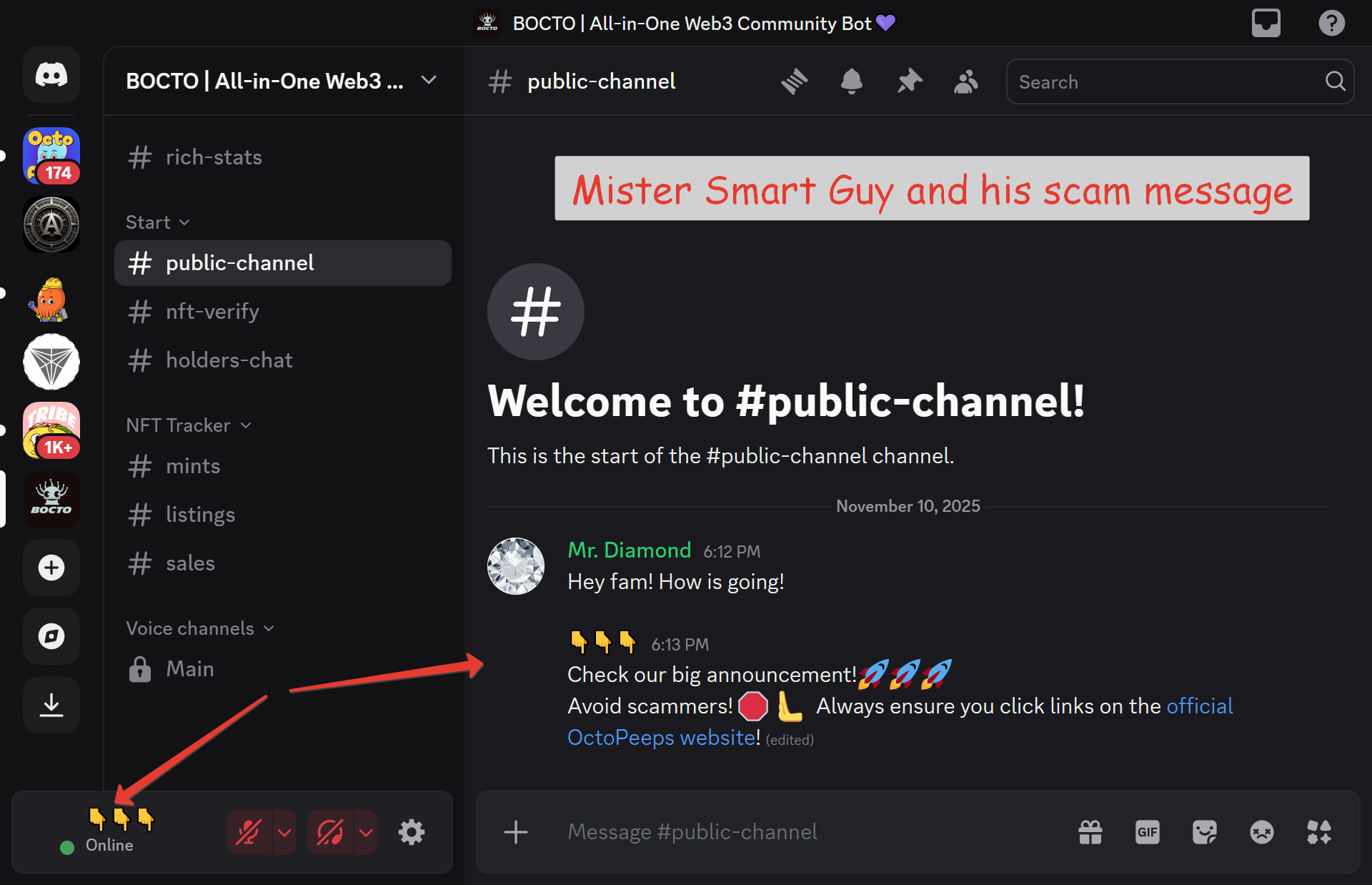
Before we start, just look at this message by **Mr. Diamond**, who is the server admin:
Did you notice anything that looks suspicious to you in this message? Probably not. And this is a problem! Because there are actually two messages from two different users!
In **Discord,** users can set up transparent PNG images for avatars, as well as use emojis instead of letters in their display names. And this is how the user profile can look as a result:
But if we inspect the source code via the developer console in the browser, we'll see that there is indeed another one PFP here - that very transparent PNG our Mr. Smart Guy set earlier for his account!
It is still a very popular scammer's trick! People in **Discord** are, in most cases, careless and relaxed, and can easily lower their guard and mistake such a message for a message from an administrator or a member of the project team.
## Explanation of the Feature.
And this is where the Users With Transparent PFPs feature comes into action! It analyzes the user avatar if its ratio of the transparent and opaque pixels matches the tolerance, and if it doesn't, it blocks the message:
Depending on your [Guard Settings](/plugins/guard/guard-settings.md), **Bocto** can also post a detailed alert to the **#alerts** channel it created during the [setup on the server](/getting-started/setup-on-server.md):
Sometimes, scammers even try to set the transparent PNG image with a small, barely visible grey opaque dot to trick the weak filters. However, **Bocto** uses a 40% tolerance barrier to determine and block scam PFPs, while allowing legit PFPs with some amount of transparent pixels.
## PFP Types That This Feature Blocks.
Currently, the Users With Transparent PFP feature only reacts to PFP transparency. In the future, we will also add an analysis algorithm for **Discord** themes' colors.
---
# Agent Instructions
This documentation is published with GitBook. GitBook is the documentation platform designed so that both humans and AI agents can read, navigate, and reason over technical content effectively. Learn more at gitbook.com.
## Querying This Documentation
If you need additional information that is not directly available in this page, you can query the documentation dynamically by asking a question.
Perform an HTTP GET request on the current page URL with the `ask` query parameter, and the optional `goal` query parameter:
```
GET https://guide.bocto.octopeeps.com/plugins/guard/guard-features/users-with-transparent-pfps.md?ask=&goal=
```
`ask` is the immediate question: it should be specific, self-contained, and written in natural language.
`goal` is optional and describes the broader end goal you are ultimately trying to accomplish on behalf of the user. GitBook uses it to tailor the answer towards what is most useful for that goal.
The response will contain a direct answer to the question and relevant excerpts and sources from the documentation.
Use this mechanism when the answer is not explicitly present in the current page, you need clarification or additional context, or you want to retrieve related documentation sections.